


Nomorobo Basic Robocall Block
3.61.64K Reviews
App Specs
- Version
- Varies with Device
- Updated On
- License
- Free
- Downloads
- 100,000+
- Developer
- Telephone Science Corp
- Categories
- Communication
- Platform
- Android
Screenshots
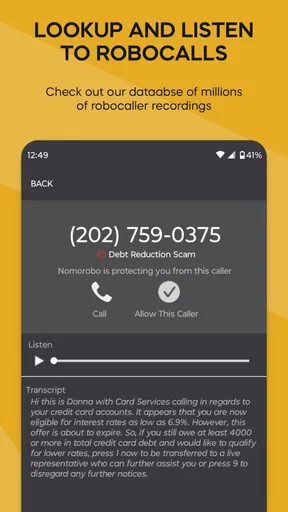
 Analysis by AppCompare
I judge call-screening apps by a practical question: do they reduce interruptions without making me miss calls I actually want? Nomorobo Basic Robocall Block is aimed at that balance. It is a communication app from Telephone Science Corp, and its focus is narrow: identify unwanted automated and nuisance calls so they are less likely to disturb your day. That straightforward purpose is appealing, but it also means this is a specialist tool rather than a replacement for every part of your phone’s calling experience.
It makes the most sense if unknown callers regularly interrupt work, family time, or a quiet evening. I would be more cautious if your routine depends on answering every unfamiliar number, since call filtering always involves a trade-off between fewer distractions and the possibility of overlooking a legitimate caller. The useful question is not whether an app can make every unwanted call disappear, but whether its approach suits the way you handle incoming calls.
What the app is trying to solve
The app’s core job is to help stop robocalls, telemarketing calls, and phone scams from reaching you. That gives it a different role from a general dialer, which mainly helps you place calls and manage contacts, or a broad communication app built around messages and video chats. Here, the value is defensive: reducing the number of interruptions you have to assess yourself.
That narrow focus can be a benefit. I would not choose a call-blocking tool because it promises to transform how I use my phone; I would choose one because it makes a recurring nuisance easier to manage. The app is free to start, carries an Everyone age rating, and has an average rating of 3.8 from around 2,600 ratings. Those figures offer a little context, but the real test for any individual is whether its screening fits their phone and their tolerance for unknown calls.
Where it fits in an everyday routine
Picture a weekday when you are in a meeting, driving, helping a child with homework, or trying to get through dinner. A string of suspected sales calls can pull your attention away even when you do not answer. A screening app is useful in that situation because it can reduce the need to make the same quick judgment over and over: should I pick up, silence it, or check the number afterward?
For a person who gets repeated nuisance calls, that small reduction in decision-making can matter more than a long list of settings. I would still keep an eye on the call history rather than assuming every blocked or flagged call was meaningless. If you are waiting for a delivery, a clinic, a new client, or another organization that may call from a number you have not saved, checking the log after a busy stretch is a sensible habit.
Choosing between filtering and manual control
Phone makers and carriers often provide their own caller identification or spam controls, while third-party screening apps offer another route. The built-in option may be enough if you only want a simple warning or basic blocking and prefer to keep your setup as lean as possible. A dedicated app is more attractive when nuisance calls are a regular problem and you want a separate tool focused on that problem.
Worth Reading Before You Choose

EA SPORTS FC Mobile 26 Is a Bigger Football Game, but It Takes Time

Flipboard Shows What News Apps Must Do Beyond the Feed

Switching to Android Auto Means Rethinking Your Driving Routine

Google Calendar Makes a Crowded Week Easier to Manage

Ludo King Makes the Most of the Minutes Between Plans

Baby Panda World Brings Quick Play to Modern Phones, but Its Game Library Feels Busy
Neither approach removes the need for judgment. Aggressive blocking may feel satisfying, but it can be a poor fit if you regularly receive important calls from numbers you do not recognize. A lighter approach that flags a suspicious call instead of treating every unfamiliar caller as unwanted may be safer for people with unpredictable schedules or responsibilities that involve new contacts. Before relying on any filter, think about how you will notice and return a legitimate call that does not ring through as expected.
Small habits that make call screening safer
I would start by using the app alongside a deliberate contact routine. Save numbers for people and organizations you call often, and check missed or filtered calls when you are expecting something important. That does not guarantee that every useful call will be handled perfectly, but it gives you a practical fallback without requiring you to answer every unknown caller on the spot.
Another useful habit is to treat call history as a review tool, not just a record of interruptions. If a number you recognize is repeatedly flagged, that is a reason to check your settings and decide whether you need a different balance. Conversely, if the log shows that the app is catching calls you would otherwise have to screen yourself, you can judge its usefulness by the time and attention it saves rather than by expecting an entirely silent phone.
People who rarely receive unwanted calls may not gain enough to justify adding another app to their routine. The same is true for anyone who prefers to screen every call personally or cannot risk a legitimate unfamiliar caller being filtered. In those cases, the phone’s own caller controls, voicemail, or manual silencing may be a better fit. Call screening works best when it supports your habits, not when it forces you to adopt a level of blocking that makes you uneasy.
Using Nomorobo day to day
I find the most useful way to judge Nomorobo is to treat it as one part of a call routine, not a set-and-forget guarantee. In this section, I’ll focus on practical habits for checking unfamiliar or filtered callers without letting every interruption take over the day. That everyday balance also helps explain why getting started should be a deliberate choice rather than an automatic switch to the strictest filtering.
Getting Started with Nomorobo
First things first, downloading and setting up Nomorobo Basic Robocall Block is as easy as pie. Available on both Android and iOS, you just need to head over to your respective app store, hit download, and you’re good to go. The installation process is smooth, and the app guides you through a simple setup to get things rolling.
Interface and Usability
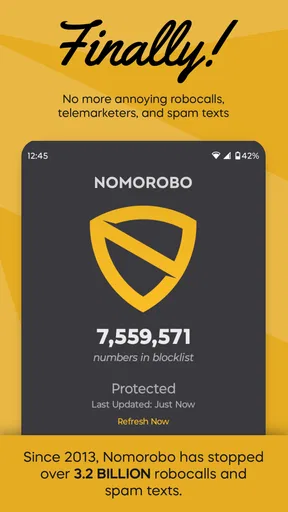
The app sports a clean and straightforward interface, which I appreciate. I’m not a fan of apps that overwhelm me with too many buttons and options. Nomorobo keeps it simple. You’ll find a straightforward menu that allows you to toggle the call blocking feature on and off, view a log of blocked calls, and access a few settings to customize your experience.
One of the standout features is the ability to report numbers. If a robocall slips through, you can report it, helping improve the overall service. It’s like being part of a community effort to rid the world of irritating calls. Nice touch!
Performance and Effectiveness
Now, let’s get to the meat of the matter. Does Nomorobo actually block those annoying calls? In my experience, yes, it does a pretty solid job. After enabling the app, I noticed a significant drop in robocalls. Calls that did sneak through were often flagged, giving me the option to ignore them.
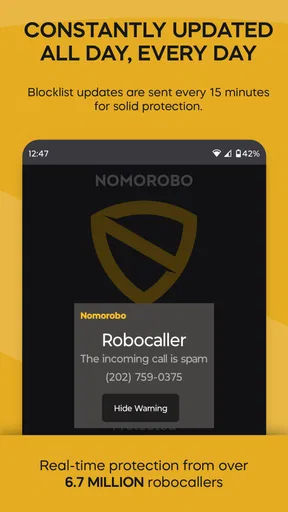
The app updates its list of known robocall numbers regularly, which means it stays relevant and effective. However, no app is perfect. There were a couple of times when a robocall managed to get through, but it’s a minor inconvenience compared to the peace of mind I’ve gained.
Customization Options
I love a bit of customization, and Nomorobo doesn’t disappoint. You can choose to block all robocalls or allow calls from certain numbers to come through. This is especially handy if you’re expecting a call from an unknown number but don’t want to risk missing it.
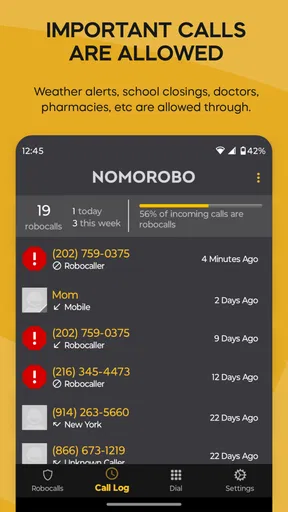
The app also allows you to view a history of blocked calls, which is a neat feature if you’re curious about what’s being filtered out. It’s like having a personal call guardian, silently working in the background.
Subscription and Pricing
While the basic version of Nomorobo is free, they do offer a premium version with more features. The premium version includes features like spam text message blocking and additional customization options. If robocalls are a major headache for you, the upgrade might be worth considering.
For most users, the free version should suffice. It provides the essential features to keep those pesky calls at bay without any cost, which is fantastic for budget-conscious users.
Final Thoughts
Overall, I found Nomorobo Basic Robocall Block to be a solid app that does what it says on the tin. It’s user-friendly, effective, and doesn’t intrude on my day-to-day phone usage. While it isn’t perfect, the peace of mind it offers is worth it.
So, if you’re tired of being bombarded by robocalls, give Nomorobo a try. It might just be the solution you’ve been searching for, and let’s face it, who wouldn’t want fewer interruptions during dinner?
Cost, scale, and what to keep in mind
The free entry point makes it easy to try the basic call-blocking approach without committing to a purchase. There are in-app purchases ranging from $2.99 to $49.99 per item, so I would check what a particular purchase includes before paying and decide whether those additions solve a problem I actually have. If my main need is fewer unwanted calls, I would first see how the basic experience fits my routine rather than assuming an upgrade is necessary.
The app has more than 100,000 installs and around 1,600 written reviews, which suggests it has reached a meaningful group of users without making it a universal choice. It was released on October 26, 2017. That history is relevant as background, but it does not by itself tell me how well the app will perform with the calls I receive today. What matters more in everyday use is whether the screening behaves predictably and whether I can recover a call I did not want to miss.
What existing users should watch for
If you already use a phone’s built-in spam protection, avoid turning on several layers of aggressive filtering without checking how they interact. Multiple tools can make it harder to understand why a call was silenced or blocked, and that confusion matters when you are waiting for a time-sensitive call. I would change one setting at a time, then pay attention to both the calls that still get through and the ones that appear in the history.
For people changing phones or adjusting their calling setup, the key question is whether the filtering remains convenient in the new routine. Revisit trusted contacts and call history after a change, especially if you rely on calls from schools, medical offices, repair services, or prospective employers. Keeping a voicemail habit can also provide a second chance to catch a legitimate caller who does not reach you live.
My overall recommendation is measured: this is worth considering if robocalls regularly interrupt you and you are comfortable checking unfamiliar or filtered calls when something important is expected. It is less compelling if your phone already handles the problem well or if your work depends on answering numbers you have never seen. The useful outcome is not a promise of silence; it is a more manageable stream of calls, with enough attention left over to make sure the filter has not hidden something you needed to hear.
Pros
- Effectively blocks robocalls.
- Easy to set up and use.
- Minimal impact on phone performance.
- Regular updates improve functionality.
- Good customer support.
Cons
- Requires constant internet connection.
- Limited features in free version.
- May block some desired calls.
- Not available in all regions.
- Occasional false positives.
FAQs for Nomorobo Basic Robocall Block
What is Nomorobo Basic Robocall Block and how does it work?
Nomorobo Basic Robocall Block is an app designed to protect users from unwanted robocalls and telemarketers by using a constantly updated database to identify and block these calls. Once installed, the app automatically detects potential spam calls, preventing them from reaching your phone. It works seamlessly in the background, offering peace of mind without disrupting your daily phone use.
Is Nomorobo Basic Robocall Block free to use?
Nomorobo Basic Robocall Block offers both free and premium features. The basic version provides essential call blocking capabilities at no cost. However, users can opt for a subscription-based premium version that includes additional features such as enhanced spam detection and customizable blocking options, offering a more comprehensive protection against unwanted calls.
How effective is Nomorobo in blocking robocalls and spam?
Nomorobo Basic Robocall Block is highly effective, with a large database that is continuously updated to improve spam detection. Users report a significant reduction in unwanted calls. However, no system is perfect, and some spam calls may occasionally get through. Regular updates and user feedback help improve the app’s accuracy over time.
Does Nomorobo Basic affect phone performance or battery life?
Nomorobo Basic Robocall Block is designed to have minimal impact on device performance and battery life. It operates efficiently in the background, using optimized algorithms to detect and block calls without draining resources. Users typically experience no noticeable slowdown or excessive battery usage when running the app.
Can Nomorobo Basic Robocall Block access my personal data?
Nomorobo Basic Robocall Block prioritizes user privacy and security. The app requires certain permissions to function, such as call and contact access, but it does not collect personal data or share it with third parties. Users can review and adjust privacy settings to ensure comfort with the app’s operations.


